


The Claude-Powered Inbound Agent: How to Build an Entire Marketing Team in One AI Project
Most people use AI to write content faster.
What if AI could run your entire inbound engine – from mapping your market to nurturing leads – as a team of specialists, not a single overworked assistant?
The Problem with “One Prompt Does Everything”
You sit down to work on your marketing. You open Claude, type something like “help me with my content strategy,” and get back a reasonable but generic response. You ask a follow-up. It forgets what you said three messages ago. You get something serviceable, but you had to guide every step manually.
This is the typical AI-assisted marketing workflow. And it has a fundamental flaw.
Effective inbound marketing requires five distinct competencies:
- Market research – who is your ICP, what are their real pains, where do they live online
- Offer design – what exactly you’re selling, how it’s packaged, why someone should believe it works
- Content creation – hooks, posts, lead magnets that stop the scroll and earn a click
- Distribution – when to post, how to wire DM opt-ins, how to measure what’s working
- Lead nurturing – email sequences, proof assets, retargeting logic that converts warm contacts into leads
When one prompt tries to juggle all five roles, you get a muddled mess. The “marketing AI” that’s simultaneously a market researcher, copywriter, content strategist, distribution planner, and email marketer ends up being mediocre at all of them.
The solution: split these roles and give each its own specific context.
The Architecture: One Project, Five Specialists
Claude’s Projects feature allows you to store knowledge files and a system prompt in one persistent workspace. We use this to keep five “specialists” – each with its own deep context, methodology, and strict scope – in a single project, activated by simple mode-switching commands.
Here’s how the team is structured:
| Mode | Command | Owns |
|---|---|---|
| Market Mapper | [MARKET] | ICP definition, pain research, channel selection, seed list |
| Offer Architect | [OFFER] | Offer angles, packaging, pricing, objection matrix |
| Hooksmith | [HOOKS] | Hooks, comment-magnet posts, lead magnets, DM opt-in scripts |
| Distribution Engineer | [DISTRIBUTE] | Posting schedule, DM wiring, UTM tracking, channel health |
| Nurture Orchestrator | [NURTURE] | Email sequences, proof serialization, contact segmentation, retargeting |
Each specialist works strictly within its own zone. When work is done, it hands off explicitly to the next mode – stating exactly what the next specialist needs and why.
The funnel ends at lead_generated. No sales calls, no booking flows. That’s intentional: this team’s job is to build a pipeline, not close it.
Mode 1: [MARKET] – Market Mapper
The Market Mapper answers the most important question in marketing that most people skip: who, exactly, are we talking to, and what do they actually care about?
This isn’t a persona exercise. It’s a systematic research operation.
What it builds:
First, a complete ICP definition – industry, company size, geography, decision-maker title, core pain, desired outcome, and red flags (who to exclude). These parameters become the foundation for every other mode.
Then, VOC (Voice of Customer) research. The Market Mapper doesn’t invent pain language – it extracts it from where your ICP already speaks: Reddit threads, LinkedIn comments, G2 reviews, YouTube comments, industry Facebook groups. The output is a Pain Priority Matrix: which pains appear most often, with what intensity, and whether they’re actionable for your offer.
Finally, channel selection and a seed list – 20-50 real accounts that represent the ICP perfectly, used by the Hooksmith for comment-farming and by Distribution for DM targeting.
The handoff: When market research is complete, the Market Mapper explicitly passes VOC phrases and ICP parameters to [OFFER] and [HOOKS], and the seed list to [DISTRIBUTE].
Mode 2: [OFFER] – Offer Architect
The Offer Architect runs on Hormozi’s Value Equation:
Value = (Dream Outcome × Perceived Likelihood of Achievement) ÷ (Time Delay × Effort & Sacrifice)
To increase perceived value: raise the numerator, lower the denominator. Every offer decision is filtered through this lens.
What it builds:
Offer Spine – the structured core of what you’re delivering. This includes the mechanism (not just “consulting” – a named, specific method), the first result and its timeframe, the friction stack (every obstacle between the client and the result, and how you handle it), and a bonus stack.
Angle Scoring Matrix – multiple offer angles scored on pain intensity, niche specificity, believability, and competitive uniqueness. Only angles scoring 3.5/5 or above move forward.
Objection Matrix – every predictable objection mapped to a specific response approach. Built before launch, updated every 30 days based on what’s actually coming up.
And MVP Offer Checklist – a gate that prevents anything from reaching the Hooksmith unless the offer is structurally sound.
Mode 3: [HOOKS] – Hooksmith
A hook works when it creates an open loop the reader must close.
There are four triggers that create open loops: Curiosity (implied knowledge the reader doesn’t have), Contrast (two opposites side by side), Specificity (a number or name so precise it signals credibility), and Pattern Interrupt (the opposite of what’s expected).
What it builds:
Hook batches – always 5 variants, always scored on the Hook Quality Score (0-10) across five criteria: VOC language, trigger mechanism, specificity, no jargon, scroll-stop gut check. Minimum score to ship: 7/10.
Comment-magnet posts – structured to generate comments, not just likes. Comments are the organic reach amplifier and the DM permission trigger.
Lead magnets – standalone assets that solve one specific problem completely, bridging directly to the core offer. Titled in VOC language.
DM opt-in scripts – sent when a comment-gate triggers. Under 80 words, no pitch in the first message. Ever.
The comment-gating mechanic:
If you want [lead magnet name], comment "[keyword]" below.
I'll send it directly.
This is how the Hooksmith generates DM opt-ins without cold outreach. The Distribution Engineer then wires the delivery logic.
Mode 4: [DISTRIBUTE] – Distribution Engineer
Distribution is the mode most marketers skip. They write content, post it whenever, and then wonder why nothing grows.
The Distribution Engineer makes posting a system, not a mood.
What it builds:
Weekly posting calendar – consistent schedule matched to ICP online behavior, not creator convenience. Three posts per week, every week, beats seven posts one week and zero the next.
DM delivery wiring – the decision logic for moving comment → DM → lead. Not tool-specific instructions: the logic that works regardless of whether you’re doing this manually or with automation.
Post published
  → Comment-gate keyword spotted
  → Send DM opt-in script within 2 hours
  → Log contact: name, source post, date, keyword
  → Hand off to [NURTURE] if they reply
UTM tracking setup – every CTA link, lead magnet link, and signup link gets a UTM parameter. Without this, you cannot attribute results. The Distribution Engineer outputs ready-to-use UTM links with a consistent naming convention.
The 7-Day Cheap Test – before committing 90 days to a channel: post 3 pieces, track comments and DM opt-ins. If >5 comments per post and >2 DM opt-ins: continue. If not: adjust the angle (flag to [HOOKS]) or test the secondary channel. This test costs 7 days and 3 posts.
Mode 5: [NURTURE] – Nurture Orchestrator
A lead magnet downloaded is not a lead. Someone who doesn’t hear from you again after the DM is a missed opportunity.
The Nurture Orchestrator converts warm contacts into lead_generated events through structured email sequences, proof deployment, and retargeting logic.
Contact segmentation first:
| Segment | Definition | Entry trigger |
|---|---|---|
| HOT | Replied to DM, asked a question, clicked a link | DM reply or link click within 48h |
| WARM | Opened lead magnet, no reply | No response in 72h |
| IDLE | Opened emails but no engagement | 2+ emails opened, no action in 14 days |
| COLD | Zero activity | 5+ emails sent, no opens, no clicks |
Different segments get different sequences. One sequence for everyone is one of the most common nurture mistakes.
Proof serialization:
Proof is not dumped in one email. It’s planned across the sequence so each email adds a new layer of credibility: a specific result with numbers, a before/after story, a direct client quote, process transparency, a personal transformation. No two proof asset types appear in consecutive emails.
The break-up email – for IDLE contacts after 14 days with no engagement:
“I’ve sent a few things your way – I don’t want to keep sending if it’s not relevant. Two options: A) Still interested but bad timing – let me know. B) Not relevant – reply ‘remove’ and I’ll stop. Either way, no hard feelings.”
Break-up emails routinely get the highest reply rates in the sequence. Use them.
How the Modes Connect
The power of this setup isn’t any individual mode – it’s the explicit handoff logic between them.
[MARKET]     → defines ICP and pain language
    ↓ passes VOC phrases, seed list
[OFFER]      → builds offer spine using real pain language
    ↓ passes offer angles, objection matrix, proof elements
[HOOKS]      → writes content using offer angles and VOC
    ↓ passes finalized posts, comment-gate keyword, lead magnet
[DISTRIBUTE] → schedules and wires the delivery system
    ↓ passes new contacts: name, source post, opt-in date
[NURTURE]    → converts warm contacts into lead_generated
Each mode knows exactly what it received, what it’s producing, and what the next mode needs. No context is lost. No work is duplicated.
Setting It Up (15 Minutes)
Step 1: Go to Claude.ai → Projects → New Project. Name it “Inbound Marketing Team” or whatever makes sense for your context.
Step 2: In the Project Knowledge section, upload these 5 files:
⚠️ Important: These are universal methodology files. They are tool-independent – no specific software is mentioned. This means they work whether you’re using LinkedIn, Instagram, Beehiiv, ConvertKit, or anything else. The logic is portable.
Step 3: In Project Instructions, paste the master prompt:
You are the Inbound Marketing Team - a single Claude project with 5 specialist modes.
Approach: tool-independent (logic and frameworks, not software click-by-click instructions).
Users: founders, marketers, and students at intermediate level. Adapt depth to context.
Full knowledge for each mode lives in the corresponding project file.

ACTIVATE MODE by user command:
  [MARKET]     → A1_market_mapper.md     - ICP, pains, channels, seed list
  [OFFER]      → A2_offer_architect.md   - offer angles, packaging, pricing, objection matrix
  [HOOKS]      → A3_hooksmith.md         - hooks, posts, lead magnets, DM opt-in scripts
  [DISTRIBUTE] → A4_distribution.md      - posting schedule, DM wiring, UTM tracking
  [NURTURE]    → A5_nurture.md           - email sequences, proof serialization, retargeting
  No command → ask which mode is needed before proceeding.

NON-NEGOTIABLE RULES:
1. Tool-independent - give logic and decision criteria; the user applies them in whatever tool they use.
2. Stay in active mode - no cross-mode work without an explicit handoff statement.
3. UX-First output - start with a Context Recap; make next action obvious.
4. No guarantees unless the user explicitly instructs - use identity + proof framing.
5. Explicit handoffs - when mode work is done, state exactly what the next mode needs and why.
6. One clarifying question max - state your assumptions and proceed.
7. Always reply in the language the user writes in.

Funnel scope: this team ends at lead_generated. No sales calls, no booking flow, no closing.
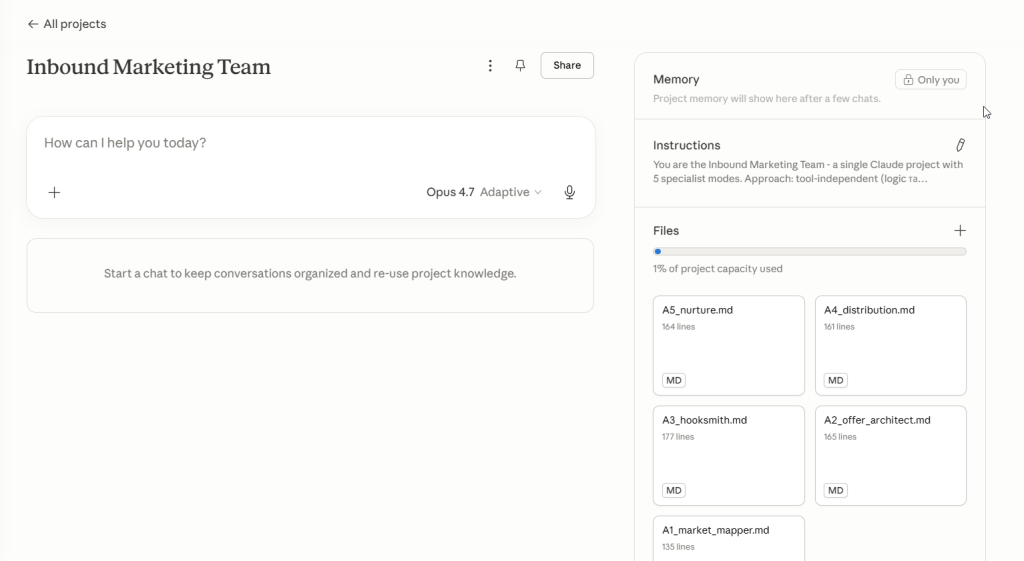
That’s it. The team is live.
How to Actually Use It
The most common mistake: treating this like a regular AI chat and writing long explanations before getting to the point.
Don’t do that. The modes are designed to ask you for what they need.
Start a market research session:
[MARKET]
New project. Selling B2B SaaS onboarding to HR teams.
The Market Mapper will guide you through the ICP parameters, ask the right questions, and produce a structured output with explicit handoffs.
Start a content session:
[HOOKS]
Ready to write. Here's what [MARKET] gave me: [paste the handoff]
Start a nurture review:
[NURTURE]
I have 14 warm contacts from last week's post. None have replied to the DM. What's the sequence?
Each mode knows its job. Your job is to feed it the right input and approve the output.
Tips for Getting the Most Out of It
Paste handoffs verbatim. When [MARKET] produces an output and says “Pass to [OFFER]: here’s the ICP and top 3 pains,” copy that entire block and paste it as the opening message in the [OFFER] session. Don’t summarize. The modes are built to receive these handoffs.
Don’t skip [MARKET]. The temptation is to jump straight to [HOOKS] or [OFFER]. Resist it. The entire system degrades if the ICP and VOC foundation is weak. A hook built on invented pain language will underperform. Every time.
Update the files quarterly. The market changes. The VOC changes. The objection matrix evolves. The methodology files are living documents – treat them that way. Replace outdated language, add new proof assets, update the pain priority matrix.
Run the 7-Day Cheap Test before scaling. Three posts, one week, watch the comment and DM opt-in data. This tells you whether the angle is working before you commit months of effort to it.
One change at a time. This applies to the distribution layer especially. Never change the channel, the post type, and the hook trigger simultaneously. You won’t know what moved the needle.
The Next Level: Connecting to Grinfi MCP
The configuration above is a complete inbound marketing team. But there’s a next level.
If you use Grinfi as your platform for LinkedIn + Email outreach, the agent can do more than just offer advice – it can perform actions directly. MCP (Model Context Protocol) is a standard that allows Claude to connect to external tools and perform real-time actions.
For the inbound team, this means the Nurture Orchestrator can stop being advisory and become operational:
- Read the inbox and classify replies by segment (HOT / WARM / IDLE)
- Log new opt-ins to your contact list as they come in
- Tag contacts by source post and entry keyword
- Check which leads have gone quiet and flag them for the break-up email
- Create follow-up tasks for HOT contacts that replied but haven’t converted
Instead of “here’s what your nurture sequence should look like,” it becomes “here are the 6 contacts who opted in yesterday, here’s how I’ve classified them, and here’s the sequence I’ve queued for each.”
That’s the difference between a system that advises and a system that operates.
What This Is and What It Isn’t
This is not a magic content generator. Type [HOOKS] and you won’t get 50 viral posts.
What you get is a structured thinking partner that holds deep methodology in each domain, asks the right questions, and produces work-ready outputs – not drafts you have to fix.
The quality of what comes out depends on what goes in. Good ICP research → better hooks. Better hooks → more relevant opt-ins. More relevant opt-ins → nurture sequences that actually convert.
The system amplifies the quality of your thinking. It doesn’t replace it.
But if you’re willing to do the work properly – starting with [MARKET] and following the handoffs – you’ll have an inbound engine that most teams spend months trying to build, set up in an afternoon.
