
In B2B sales, the hardest part is timing it right – identifying the moment when a company is actually ready to talk about a purchase. One of the strongest signals of that moment is open job positions.
If a company:
- is hiring for sales, marketing, or operations roles
- is expanding its team
- is investing in growth
it means the company has budget, pain points, and a need for solutions.
In this article, we’ll break down how to build an automated outbound pipeline that:
- Finds companies with relevant job openings
- Extracts decision-makers (DMs)
- Automatically sends leads to Grinfi
- Runs outreach with zero manual work
1. Finding Job Openings in Clay (Find Jobs)
We start with the Find Jobs module in Clay. The key here is not to “collect everything,” but to filter only what actually makes sense for sales.
Recommended filters:
- Job keywords (Sales, SDR, Marketing, RevOps, etc.)
- Location (if relevant)
- Company type or size
- Limitation: 1 job per company to avoid noise
The goal of this step is to create a table of companies with a clear hiring signal.
2. Finding Decision-Makers (Find People at these companies)
Next, in Clay, we use Find People at these companies.
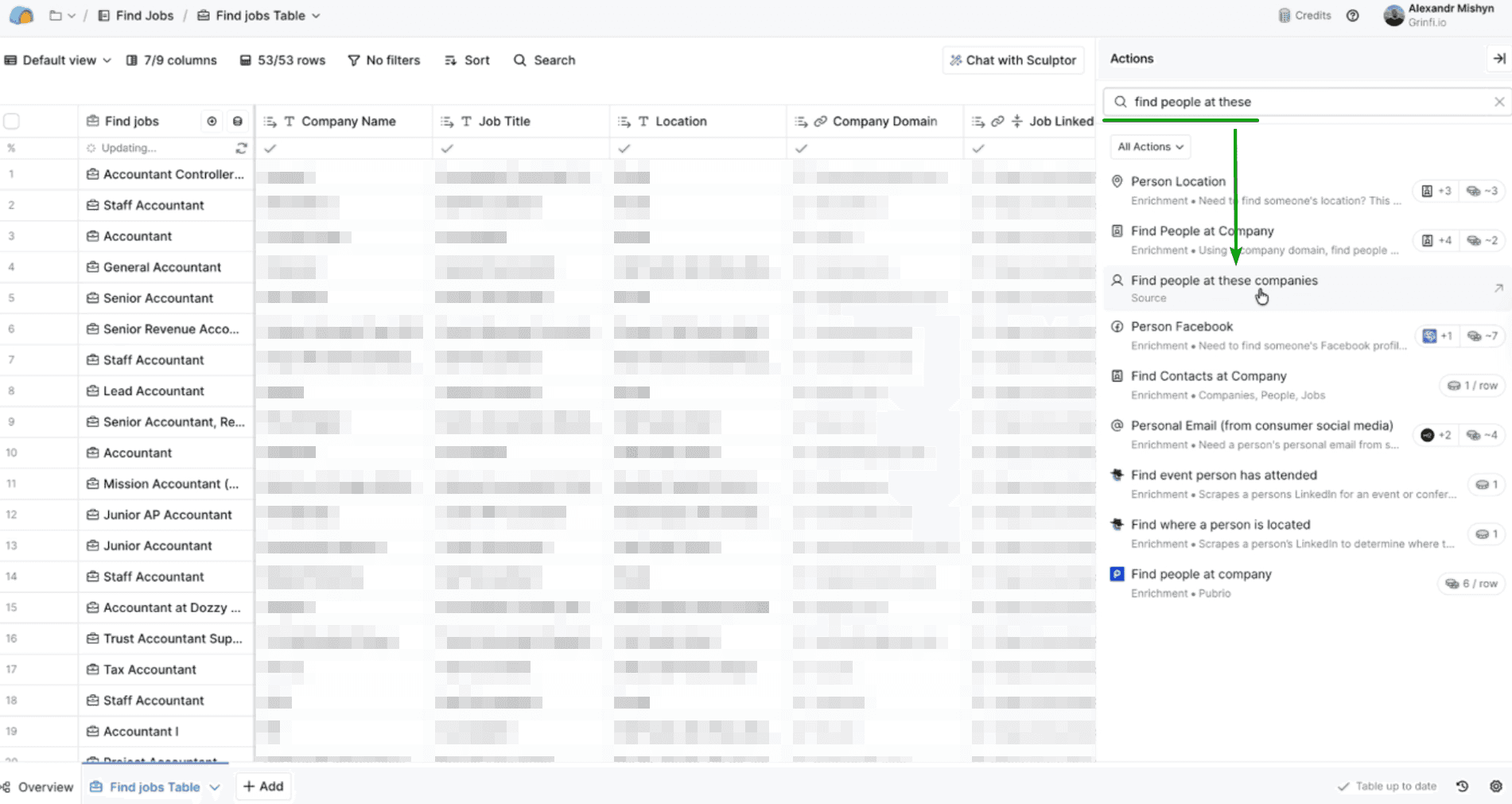
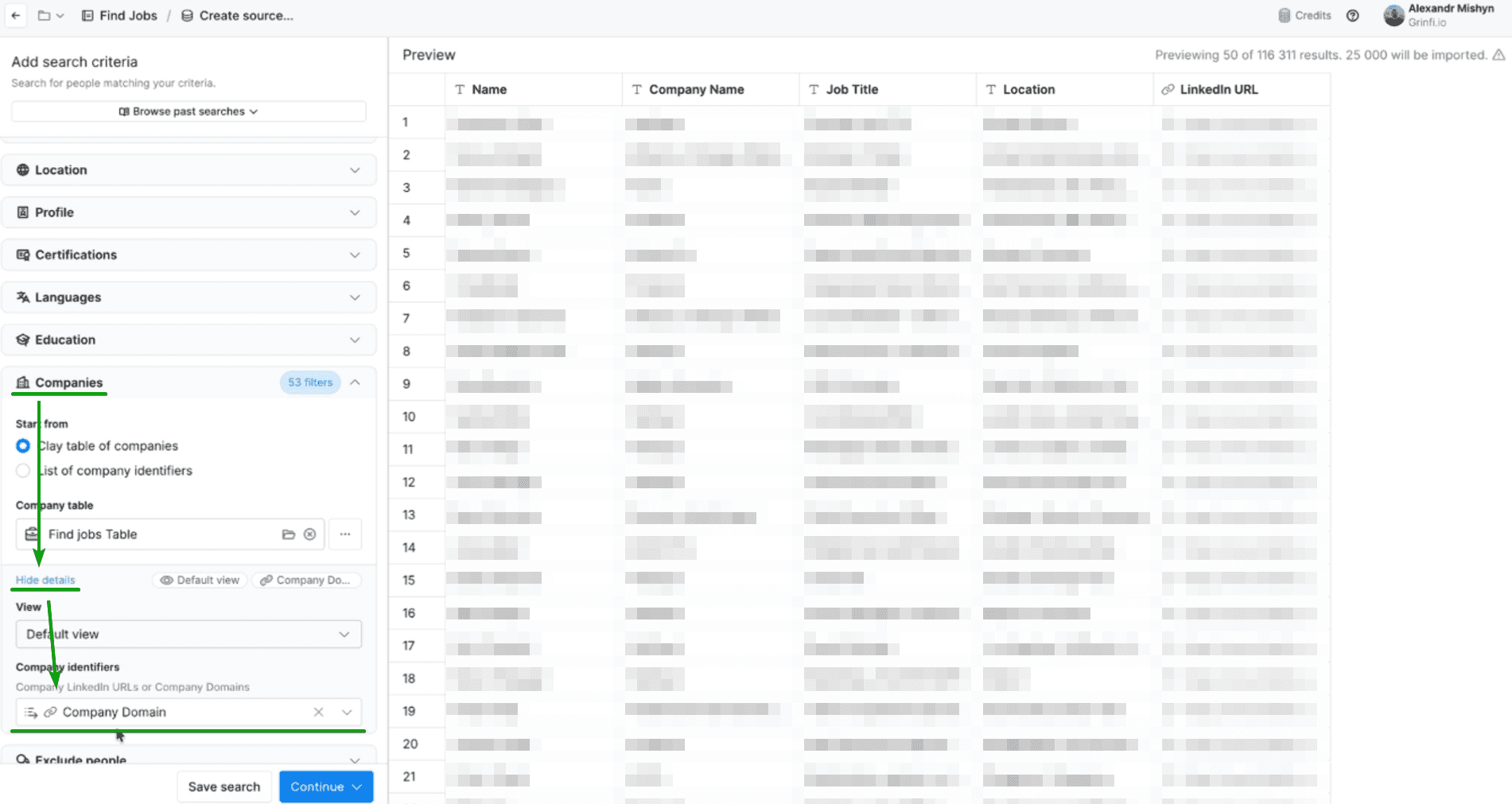
How to set it up:
- Search by company domain or LinkedIn URL
- Filter by job title / title keywords
- Narrow down strictly to decision-makers
Most commonly used roles:
- Founder / Co-Founder
- CEO
- Owner
- Managing Director
- Head of Sales / VP Sales
- Head of Marketing / Growth
After that, Clay creates a separate table with people (People table).
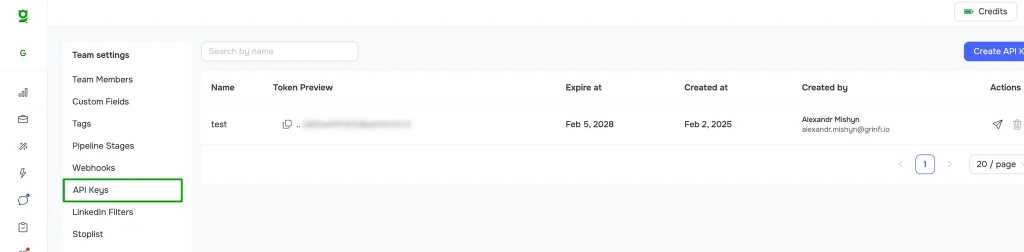
3. Create an API Key in Grinfi
On the platform, go to Grinfi API Keys and create a new key for Clay.
4. Set Up a POST Request in Clay
In Clay:
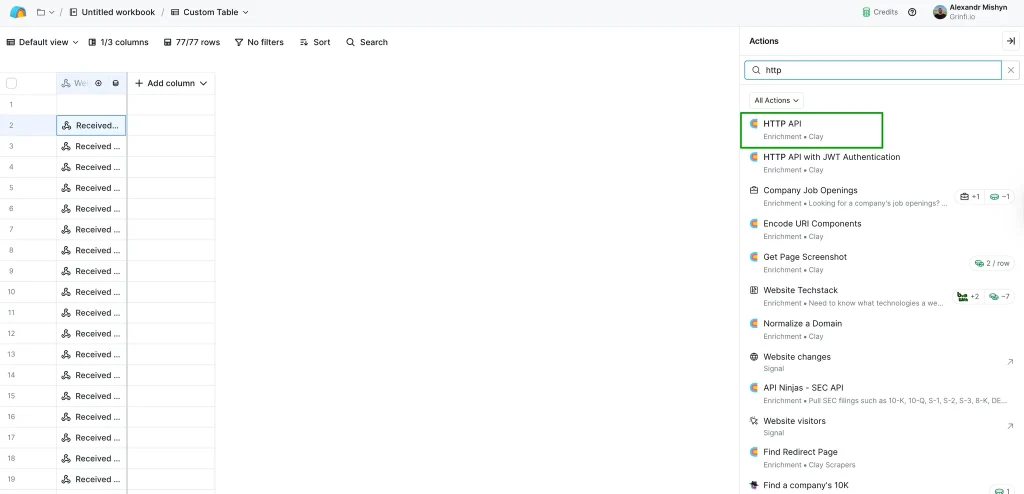
- Open the HTTP API section
- Create an HTTP API (Headers) account
Key: Authorization
Value: Bearer {Your Grinfi API Key}- Create a new action with the
POSTmethod - Endpoint:
https://leadgen.grinfi.io/leads/api/leads/upsert - The request body should look like this:
{
  "list_uuid": "YOUR LIST UUID",
  "lead": {
    "linkedin_id": "LinkedIn Profile",
    "first_name": "First Name",
    "last_name": "Last Name",
    "headline": "",
    "position": "Job Title",
    "company_name": "",
    "domain": "Company Domain",
    "email": "",
    "raw_address": ""
  },
  "custom_fields": {},
  "update_if_exists": true,
  "move_to_list": false
}
⚠️ IMPORTANT! These values are not just plain text. You must select the correct variable by starting to type the “/” symbol.
5. Sending Leads to Grinfi
Next, data transfer to Grinfi is configured.
How it works:
- A Clay template is used to send the data
- The Grinfi API key is inserted
- The Grinfi list UID is added – where the leads should go
Once Clay runs, it automatically sends new decision-makers to the selected Grinfi list.
6. Auto-Filtering and Automation in Grinfi
In Grinfi, you:
- Connect this list to automation via Auto filter
- Define conditions for a lead to enter a segment
- Launch the required outreach funnel
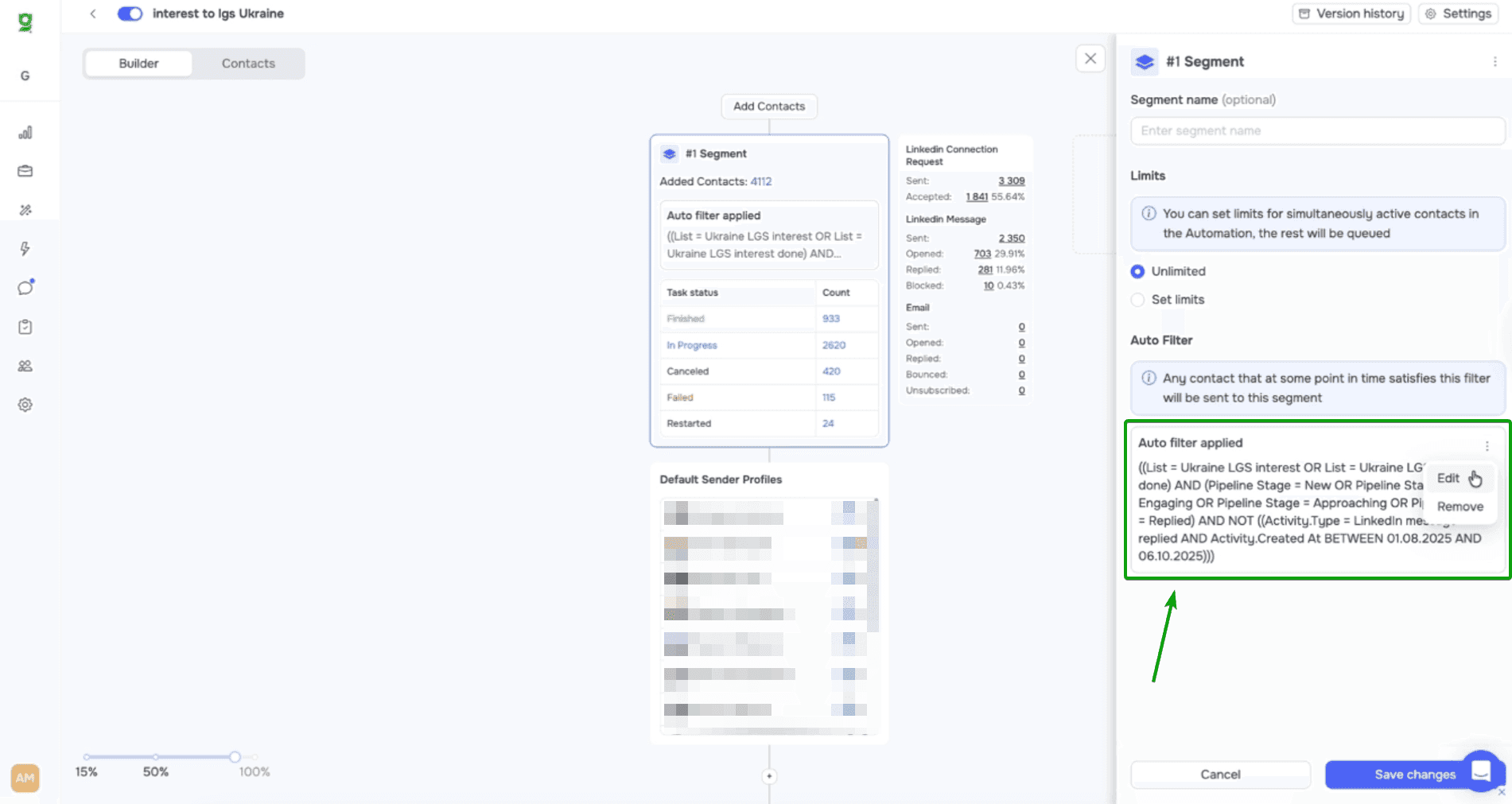
As a result:
- New leads → automatically enter a segment
- The segment → automatically triggers a sequence
- The sales team doesn’t touch routine work
7. Automatic Pipeline Scheduling
To make the system work without human involvement, you need to enable scheduling in Clay.
A practical setup:
- Find Jobs – every 3 days
- Find People – on the same day with a 30–60 minute delay, or the next day after Find Jobs.
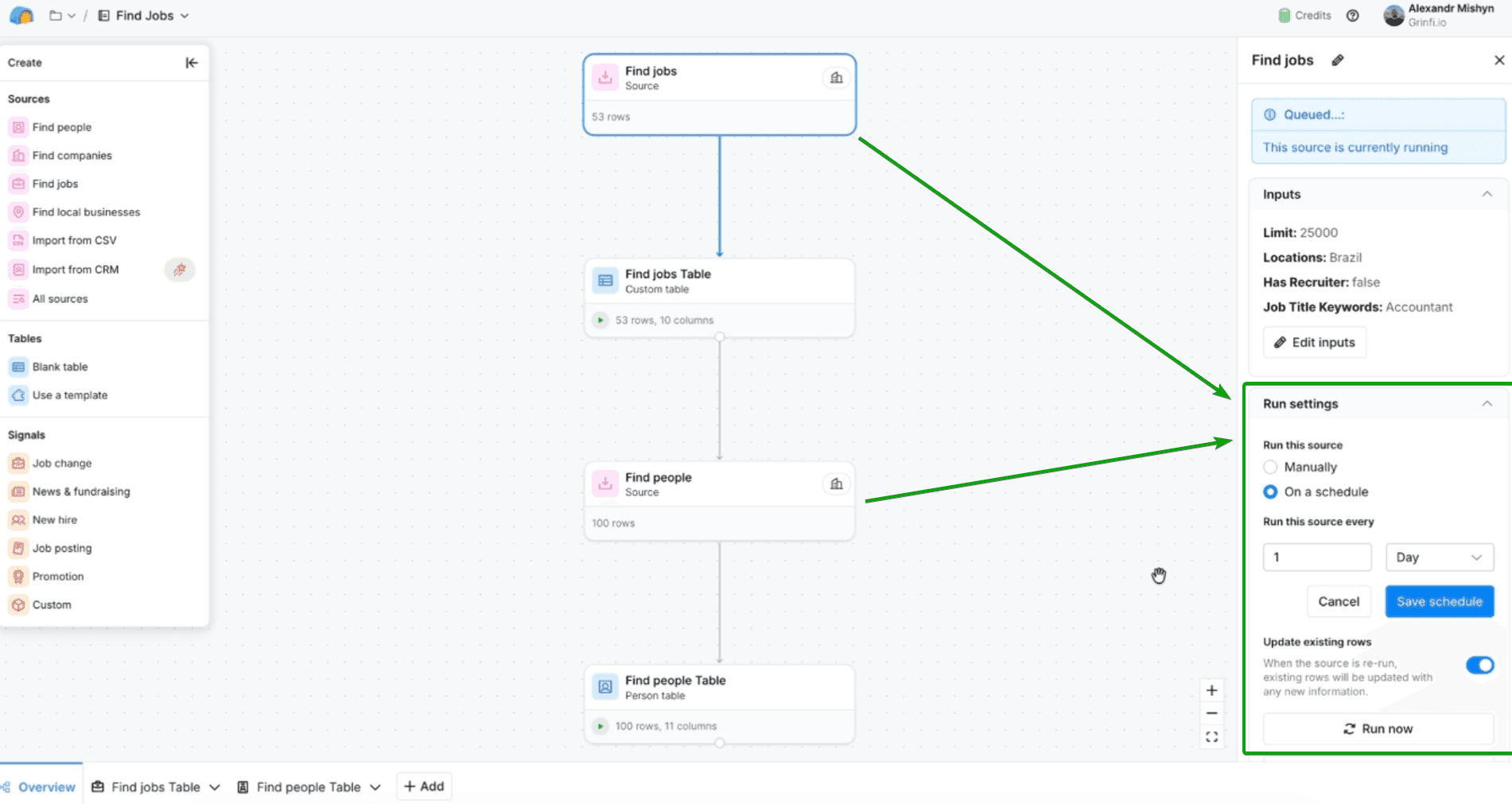
This way, Clay continuously:
- Finds new job openings
- Updates the list of people
- Sends new leads to Grinfi
Why Outbound Based on Job Openings Works Better
- It’s a real trigger, not a cold list
- The message is easy to personalize around a specific role
- Response rates are higher than classic cold outreach
- It scales perfectly through automation
Example Message for a Hiring Signal
“I saw that you opened a position for {role}. At this stage, companies usually face {common challenge}. We help teams like yours achieve {result} faster. I’d be happy to share a few ideas tailored to your case. Would you be open to a quick call?”
The Clay + Grinfi combination makes it possible to build a fully automated B2B outbound system based on real market signals.
- Clay identifies when and who to contact
- Grinfi handles how and what to write
- Sales stays focused on conversations – not spreadsheets